
The Sweet Side Of Web Personalisation – Cookies
Do you know why protection and personalization feel so sweet? It’s because of cookies!
We’re not talking about the delicious chocolate ones that pair perfectly with a good cup of coffee, but internet cookies. Web cookies are small text files that store data used to identify your device while you browse the internet.
They are an essential part of the modern web, helping improve user experience, personalization, and convenience. When enabled, cookies can remember your login details, items you viewed or purchased, and pages you visited.
But how do these small files actually work? When you send an HTTP request to access a website, the server responds by sending back data along with a cookie. This cookie typically contains a small piece of information, such as a unique ID associated with your device. The cookie is then stored on your computer. When you revisit the same website, your browser sends the cookie back to the server, allowing the site to recognize you and recall your previous activity. That’s why you don’t always have to re-enter your login details.
A simple analogy is visiting a restaurant for the first time and placing an order. The next time you return, the waiter might remember you and ask if you’d like the same dish again.
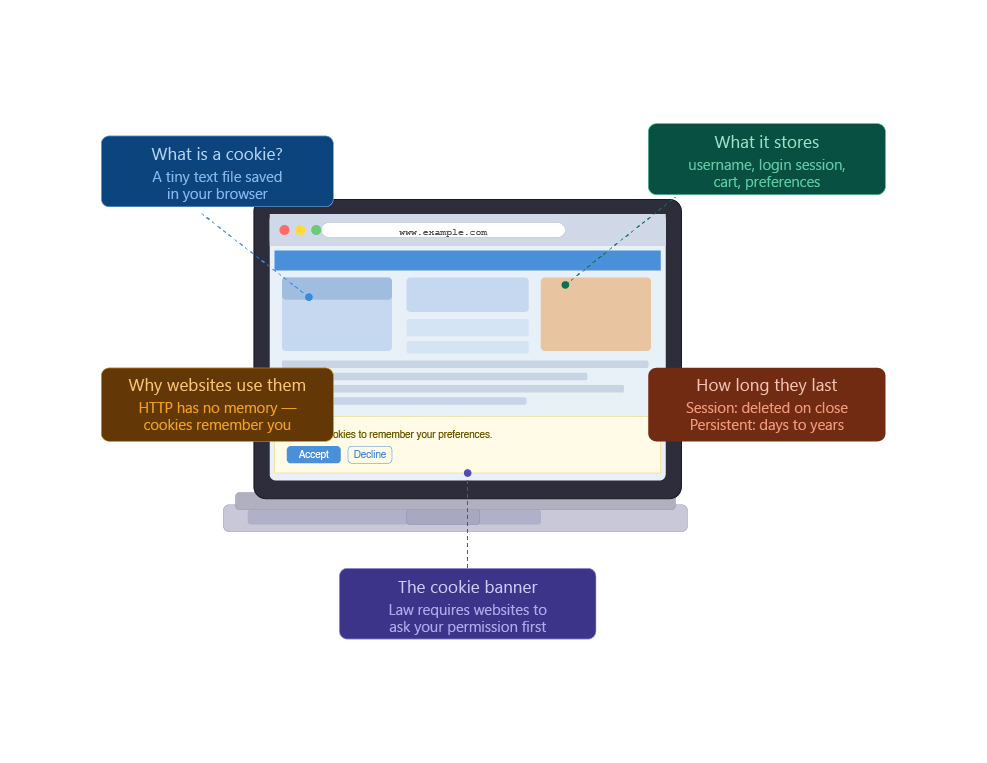
Not all cookies last the same amount of time. Session cookies are temporary and are deleted automatically when you close your browser. They are typically stored on random access memory. Persistent cookies, on the other hand, remain on your device for a longer period. They usually have an expiration date and can last for months or even years, and are often used for authentication and tracking purposes.
Cookies can also be categorized based on where they come from and how they are used. First-party cookies are created by the website you are currently visiting and are generally safe, especially if the website is trustworthy. A common example is essential cookies, which are necessary for basic website functionality.
Third-party cookies are created by domains other than the one you are visiting. They are often used for advertising and tracking across different websites and can raise privacy concerns.
There are also so-called “zombie” cookies, a type of persistent third-party cookie that can recreate itself even after being deleted. They do this by storing backup copies outside the standard cookie storage.
Authentication cookies are created when you log in to a website. They help manage your session and ensure that sensitive information is delivered securely to your account.
Tracking cookies monitor user activity and are often used by analytics and advertising services to collect data about browsing behavior.
While cookies significantly improve your browsing experience, they can also pose privacy risks. Hackers and cybercriminals may exploit cookies to gain access to personal data or track your activity without your consent.
You can reduce these risks by disabling third-party cookies in your browser settings, using a VPN (Virtual Private Network), or browsing in incognito or private mode.
Cookies play a major role in personalization, authentication, and overall web functionality. However, they also come with potential privacy risks if not properly managed. That is why many countries have introduced regulations governing cookie usage to help protect users from misuse and cyber threats. So, next time you see the banner asking you to allow cookies, make sure you make an informed decision and know how your data will be used.
